Why doesn't the SharpCap Pro Link Button work?
Why doesn't the SharpCap Pro Link Button work?
If you encounter the following error when attempting to connect to SharpCap Pro using its link button: "Windows cannot find '...\SharpCapPro.exe'. Make sure you typed the name correctly, and then try again.", this may indicate a misconfiguration of the SharpCap Pro folder paths in HelioMaker. Please reopen the SharpCap Pro Configuration in HelioMaker and enter the correct SharpCap Pro installation path. For more details, please refer to the SharpCap Pro Configuration section.
If you encounter an issue where the SharpCap Pro link button remains red, and after waiting more than 30 seconds, SharpCap Pro appears to load but fails to connect, consider the following potential causes and solutions:
-
SharpCap Pro Initialization Delay and Timeout:
SharpCap Pro may take longer to fully load, initialize, and establish a connection with HelioMaker, especially during the first start after a system restart. HelioMaker has a built-in timeout of 30 seconds while awaiting connection with SharpCap Pro.
Solution: Press the link button again to allow HelioMaker to retry the connection. This additional attempt can help establish a successful link once SharpCap Pro has fully initialized.
-
SharpCap Pro Version Compatibility:
Verify that you are using the latest version of SharpCap Pro (version 4.1.12221.0 or later is required by HelioMaker). If you are using an older version, consider updating or reinstalling the latest version of SharpCap Pro to ensure compatibility.
-
Invalid SharpCap Pro License Activation:
HelioMaker relies on an active and valid SharpCap Pro license for proper functionality. An inactive or improperly activated license can prevent successful connections.
Ensure that your SharpCap Pro is properly activated with a valid license. If the license is not activated, follow the activation instructions provided by AstroSharp Ltd. to secure a valid license before attempting to connect again. If you continue to experience issues, reinstalling SharpCap Pro may help resolve license-related problems.
-
SharpCap Pro Without HelioMaker support:
If you manually start SharpCap Pro before using the Link button in HelioMaker, or if SharpCap takes longer than usual to respond, HelioMaker may detect a running instance of SharpCap Pro without HelioMaker support.
When prompted with the message:
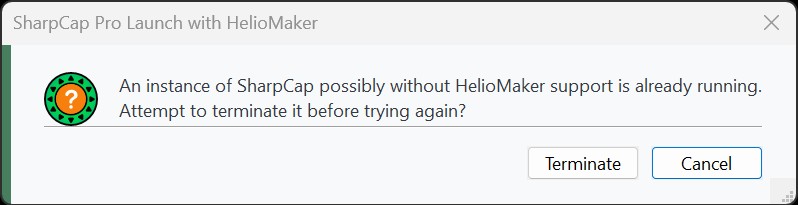
You have the following options:- Decline Termination and Wait: If you launched SharpCap Pro from HelioMaker but see this message, it may be due to a timeout. Declining and waiting a few more moments should allow HelioMaker to establish a connection with SharpCap Pro, causing the link button to turn green.
- Decline Termination: Choose to decline HelioMaker's suggestion to close SharpCap Pro and try using HelioMaker later.
- Finish Immediate Tasks: Complete any ongoing tasks in SharpCap Pro before allowing HelioMaker to terminate it.
- Accept Termination: Allow HelioMaker to terminate the running instance of SharpCap Pro. HelioMaker will then attempt to restart SharpCap Pro with the necessary linkage, enabling proper integration and functionality.
If the issue persists after attempting the above solutions, consider reaching out to HelioMaker support or consulting the user communities for further assistance.